Salesmate vs Zoho CRM: What We Learned from Working with Both Platforms
A practical perspective from ANDER Digital Agency on contact management, HTML email campaigns and customer communication across two different businesses.
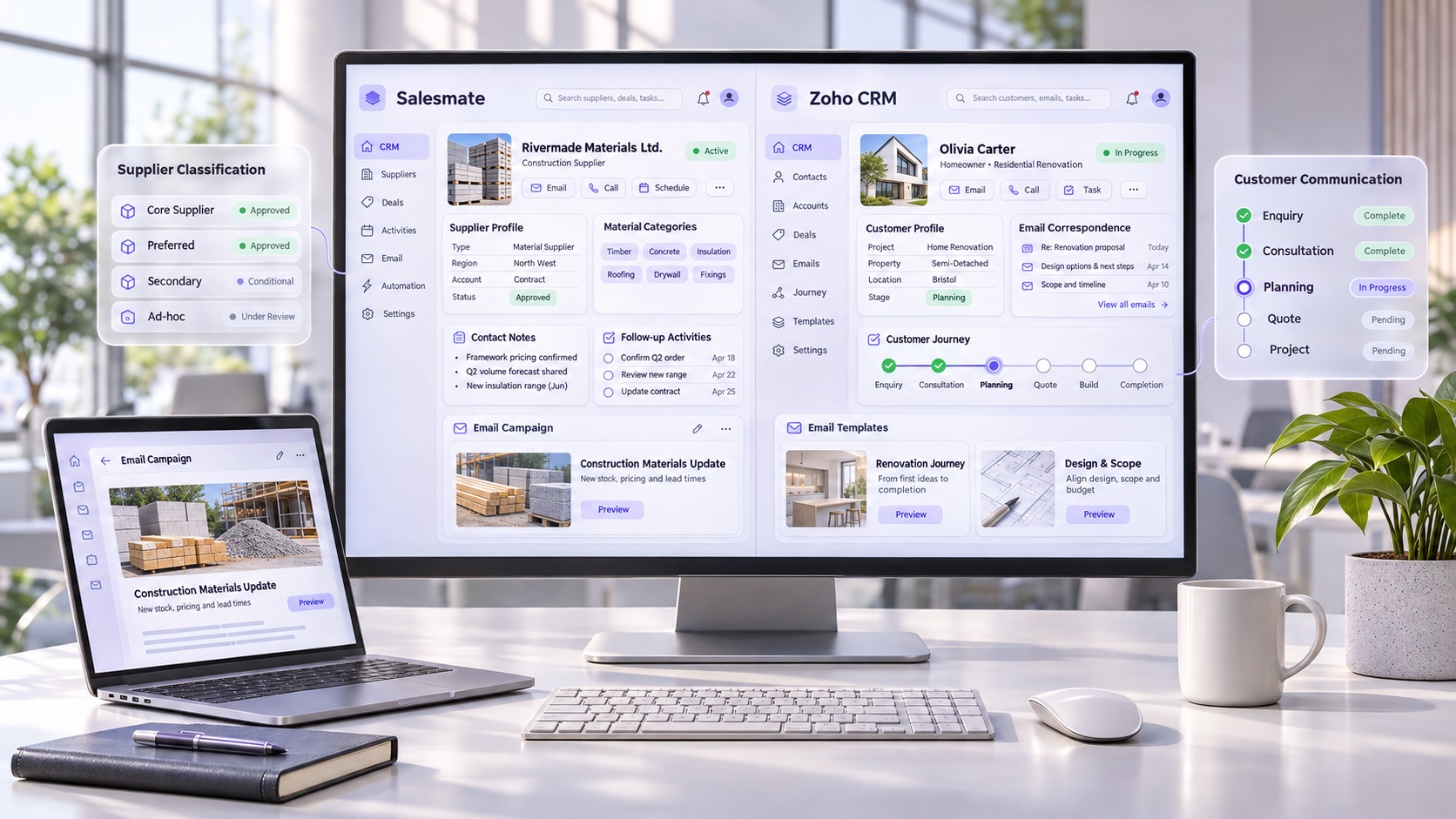
Choosing a CRM often starts with comparing features, pricing and integrations. The more revealing questions usually come afterwards: what information should the team record, how should relationships be organised, and what needs to happen after each conversation?
At ANDER Digital Agency, our work with Salesmate and Zoho CRM brought those questions into two different business environments.
For BUILDMAX, a construction materials sourcing and supply business serving Guyana and the Caribbean, our Salesmate work involved supplier information, commercial communication and email marketing. For The Renovation Team, an Auckland-based residential renovation company, our Zoho CRM work focused on email configuration review and customer communication templates.
These projects gave us practical experience of how CRM data and communication need to reflect the business using them. The comparison below follows the work we carried out, with a different scope in each platform.
Salesmate CRM: Organising Supplier Relationships and Follow-Ups
Our work with Salesmate CRM for BUILDMAX involved organising information about construction material suppliers and business contacts.
Materials sourcing requires more than a company name and an email address. A potential supplier might offer several product ranges, operate in particular markets or manufacture products that only partly match a project's requirements. That context matters when deciding whom to contact and what to ask.
Building useful supplier records
We worked with company and contact records containing information such as:
- Company names, websites and contact details
- Locations and business descriptions
- Product categories and material specialisations
- Contact people and their responsibilities
- Classification tags
- Research notes and follow-up activities
- Pipeline stages and communication status
The categories covered different construction materials and related products, including steel, sheet materials, machinery, flooring systems and specialist project materials.
The purpose of this structure was to make supplier research useful beyond the first enquiry. When returning to a company record, we needed to understand what the business offered, why it might be relevant and what still needed checking.
For example, identifying a manufacturer in the right product category was only a starting point. Its capabilities also needed to match BUILDMAX's sourcing requirements. A clear description and useful research notes helped preserve that distinction.
a larger contact database is only valuable when the team can identify the right companies and understand why they belong there.
Keeping the next action visible
Supplier communication often develops over several exchanges: an introduction, a product enquiry, a request for technical information, a commercial discussion and further follow-ups.
In Salesmate, our work connected company and contact information with notes, activities and pipeline stages. We used stages covering supplier research and initial contact preparation to distinguish companies still being evaluated from those ready for outreach.
That distinction mattered. A researched company was not necessarily a qualified supplier, and a prepared introduction did not mean a conversation had started.
A useful record should make three things easy to find: who the company is, what has happened so far and what needs to happen next.
Salesmate Email Marketing: From HTML Design to Campaign Preparation
Our Salesmate work also included branded HTML emails and campaign preparation for BUILDMAX.
This connected design and development with the practical requirements of sending commercial messages through a CRM platform.
Designing emails around a clear purpose
We worked on emails for construction-related audiences, including contractors, distributors and potential business partners. The designs combined:
- Branded headers and company identity
- Product information and supporting visuals
- Clearly separated content sections
- Calls to action
- Contact and enquiry links
- Layout adjustments for different screen sizes
Some emails introduced BUILDMAX's capabilities; others focused on particular products. One example was a campaign featuring PAVIT Ceramics, presenting product characteristics, finishes and routes to further information. BUILDMAX's PAVIT Ceramics product article provides context for the type of technical content involved.
Our website design and development experience helped with content hierarchy and calls to action. Each email needed to make the offer understandable and give the reader a useful next step, whether that was exploring a product or making an enquiry.
Testing beyond the browser preview
HTML email work also brought its own technical constraints. Email applications handle HTML and CSS differently, so a browser preview could not tell us everything about the delivered message.
During the Salesmate work, we refined layouts, adjusted spacing and visual elements, and addressed display issues in the environment being used. We also worked with image assets for selected design elements.
The practical lesson was to test the template inside the campaign workflow and inspect test messages. A design could look finished while still needing changes before sending.
Preparing the campaign and sender settings
Campaign preparation involved more than the template. We also worked with contact selection, subject lines, preview text, sender configuration and test messages.
One specific issue involved an unverified sender domain: the campaign could not proceed with the selected sender until the verification requirement was addressed.
That was a useful reminder to check sender requirements early. Email authentication and sender verification belong in campaign preparation alongside content and design. They also form part of a wider deliverability picture that includes sender reputation and recipient engagement.
a campaign depends on the contact data, message, template and sending configuration working together.
Zoho CRM: Supporting the Homeowner Renovation Journey
Our work with Zoho CRM for The Renovation Team covered a different set of requirements.
The company manages residential renovations, including whole-home, kitchen and bathroom projects. Homeowners need to understand consultations, planning, design, scope development and the decisions required before construction.
Our focus was on the email setup and communication supporting that journey.
Reviewing email integration requirements
We reviewed email configuration and synchronisation requirements, including IMAP-based integration and the handling of historical correspondence.
The objective was to understand how relevant emails could remain accessible within the customer workflow. Project requirements, expectations and agreed next steps can be spread across several conversations, making correspondence an important part of the customer context.
This work also highlighted the need to check historical email handling separately from new correspondence. Connecting an inbox and understanding which previous messages will be available are related questions, but each needs attention during configuration.
Creating templates for specific renovation stages
We also prepared customer email templates for defined stages of the renovation process. Two examples were:
Stage 1: Your Renovation Journey – 4 Stages
A customer-facing email explaining the overall renovation journey and helping homeowners understand the process ahead.
Stage 2: Detailed Design and Scope of Work for Homeowner Renovations
A template supporting communication around detailed design and scope development.
Each template had a specific job. The first helped explain the wider process; the second focused on a stage where project details and expectations needed to become clearer.
Compared with BUILDMAX's product campaigns, these emails served a different audience and purpose. Their value came from explaining what was happening and helping customers understand the next step.
customer journey templates work best when each message answers the questions people have at that particular stage.
Salesmate vs Zoho CRM: What Our Projects Showed
Working with both platforms gave us experience of different CRM tasks. The table reflects those project scopes rather than a complete comparison of the products' capabilities.
| Area | Salesmate: our work for BUILDMAX | Zoho CRM: our work for The Renovation Team |
|---|---|---|
| Business context | Construction materials sourcing and supplier relationships | Managed residential renovations |
| Main focus | Supplier records, follow-ups and email campaign preparation | Email configuration review and customer communication templates |
| Information involved | Company details, product categories, research notes and contact status | Email correspondence requirements and renovation stage content |
| Email deliverables | Branded HTML product and business emails | Templates explaining the renovation journey and design stage |
| Technical considerations | Template display, test messages and sender verification | IMAP integration, synchronisation and historical correspondence |
| Main lesson | Useful supplier data needs consistent classification and clear next actions | Customer communication needs to follow the actual service journey |
What we appreciated about Salesmate
Salesmate gave us a practical environment for working with company and contact information, follow-up activities and email campaigns within BUILDMAX's commercial workflow.
The work required consistency: useful categories, meaningful notes, clear stages and templates suited to the audience. Those decisions shaped how useful the platform was for the tasks at hand.
What we appreciated about Zoho CRM
Our Zoho work showed the value of considering email setup and customer communication together. For The Renovation Team, the content of a message mattered alongside how correspondence fitted into the working environment.
The renovation stages provided a useful structure for the templates. Each email could focus on the information a homeowner needed at that point in the process.
Which CRM is better?
These projects do not establish an overall winner. We worked on different tasks in different business environments, so they cannot demonstrate that one platform is inherently better for either industry.
A useful selection process would test both platforms against the same business requirements: everyday tasks, data structure, integrations, reporting, administration and the people who will use the system.
Our experience suggests starting with those requirements, then evaluating how well each platform supports them.
Five Lessons We Apply to CRM Work
1. Give every field and category a purpose
A field should help someone make a decision, take an action or understand a relationship. Consistent categories and useful notes make records easier to maintain and interpret.
For supplier research, this meant preserving the information needed to assess relevance and prepare the next conversation.
2. Map the process before configuring the system
Supplier sourcing and homeowner renovation services have different stages, information needs and communication patterns. The CRM structure should follow those differences.
Our CRM implementation guide develops this planning approach, covering business requirements, data structure, ownership and adoption.
3. Treat email as part of the implementation
Templates, formatting, sender settings, inbox integration and testing all affect how CRM communication works in practice.
The Salesmate campaign preparation and Zoho email review made that clear from two different directions. Email deserves time in the project scope and checks in the actual working environment.
4. Keep data maintenance manageable
Company details change, contact people move and research becomes outdated. Records need enough structure to remain useful and a clear expectation of what should be updated after each interaction.
The easier that routine is to follow, the more likely the CRM is to retain useful context.
5. Connect lead generation with follow-up
A website or marketing campaign can create an enquiry, but the business still needs to capture its context and give someone responsibility for responding.
This is where SEO and growth marketing connects with CRM planning: attracting interest needs to be followed by a dependable process for handling it.
For the practical handoff, our guide to website form–CRM integration explains how submissions, records, ownership and follow-up fit together.
How This Experience Shapes Our Approach at ANDER
Our CRM perspective comes from working across websites, digital communication, HTML email design and business workflows.
With BUILDMAX, we needed to understand how supplier research, product information and commercial communication related to one another. With The Renovation Team, we needed to understand what homeowners should be told at specific stages of a service journey.
Both projects required attention to the details surrounding the software: what information mattered, how it should be presented and what someone needed to do next.
That thinking informs how we work at ANDER. We begin with the business context, define the scope and build the digital work around a clear purpose.
For CRM projects, this means understanding the records, conversations and responsibilities the system needs to support before deciding how to configure it.
The most useful outcome is a working setup that helps people find the right information, communicate clearly and keep the next action visible.
Planning a CRM implementation or improving an existing setup? Explore our CRM & Business Systems services, or contact ANDER to discuss your current workflow.
Is your CRM helping the team move customer work forward?
We can help select, configure and integrate a CRM around your real workflows, customer journey and measurable business goals.